


IconOverlayOrder
Description
Change the priority of Explorer's icon overlays.Use this when icons such as TortoiseGit no longer appear in Explorer to easily restore icon display.
Supported OS
Windows 10/11 64bitScreen
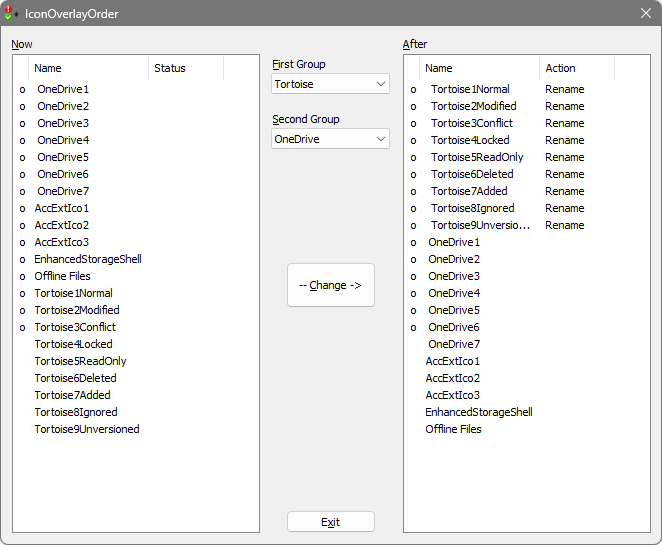
The current settings are listed on the left. Items with the same name but a leading space are displayed as "Duplicate" and will be deleted when the settings are changed.
Use the combo box in the middle to specify the group you want to raise the priority of.
The first group has highest priority. If the second group is "-", only the first group will be prioritized.
The right side shows the order after the settings are changed. Items whose priority has been raised by inserting a space or lowered by deleting a space are displayed as "Rename"
The "o" on the left of each list indicates the icon that will be enabled in Explorer.
Press the "Change" button to change the setting.
After the change is successful, you will be asked "Do you want to sign out?" - press "Yes."
Signing out and logging in again will also change the display of icon overlays in Explorer.
Download
IconOverlayOrder Version 1.0.0.1 (12/26/2025)- IconOverlayOrder1001.zip (72,318 bytes)